Cross-Border Shipping
Content design
Overview
Walmart Fulfillment Services (WFS) wanted to launch a program for international sellers to use Walmart’s transportation partners and customs brokers to send inventory to WFS warehouses in the US.
Problem
This was a new program, initially rolling out in Shenzen, China. My task was to provide all support content—including email templates and in-app strings—and ensure everything was localized to Chinese.
Goal
Surface the right information at the right time, in the right language, so international sellers can easily send inventory to the US.
Process

Mapped out the seller journey, identifying points at which sellers need communications or support.
Established a content governance framework to ensure consistency and quality across all seller-facing materials.
Met with account managers to better understand the needs of international sellers.
Worked with product designers to create intuitive and user-friendly onboarding flows.
Oversaw the translation and localization process, ensuring cultural appropriateness and accuracy in multiple languages.
Developed a feedback loop with customer support teams to identify and address common seller queries and concerns.
Coordinated with legal and compliance teams to ensure all content met international trade regulations and standards.
Design
Before getting started, I met product and program managers to align on the program’s objectives and existing development.
I then pored over seller feedback and met with account managers to fully understand the challenges and needs of our international sellers.
I was then able to map out the seller journey from when sellers onboard to when sellers ship inventory and it’s delivered to a Walmart fulfillment center (FC).
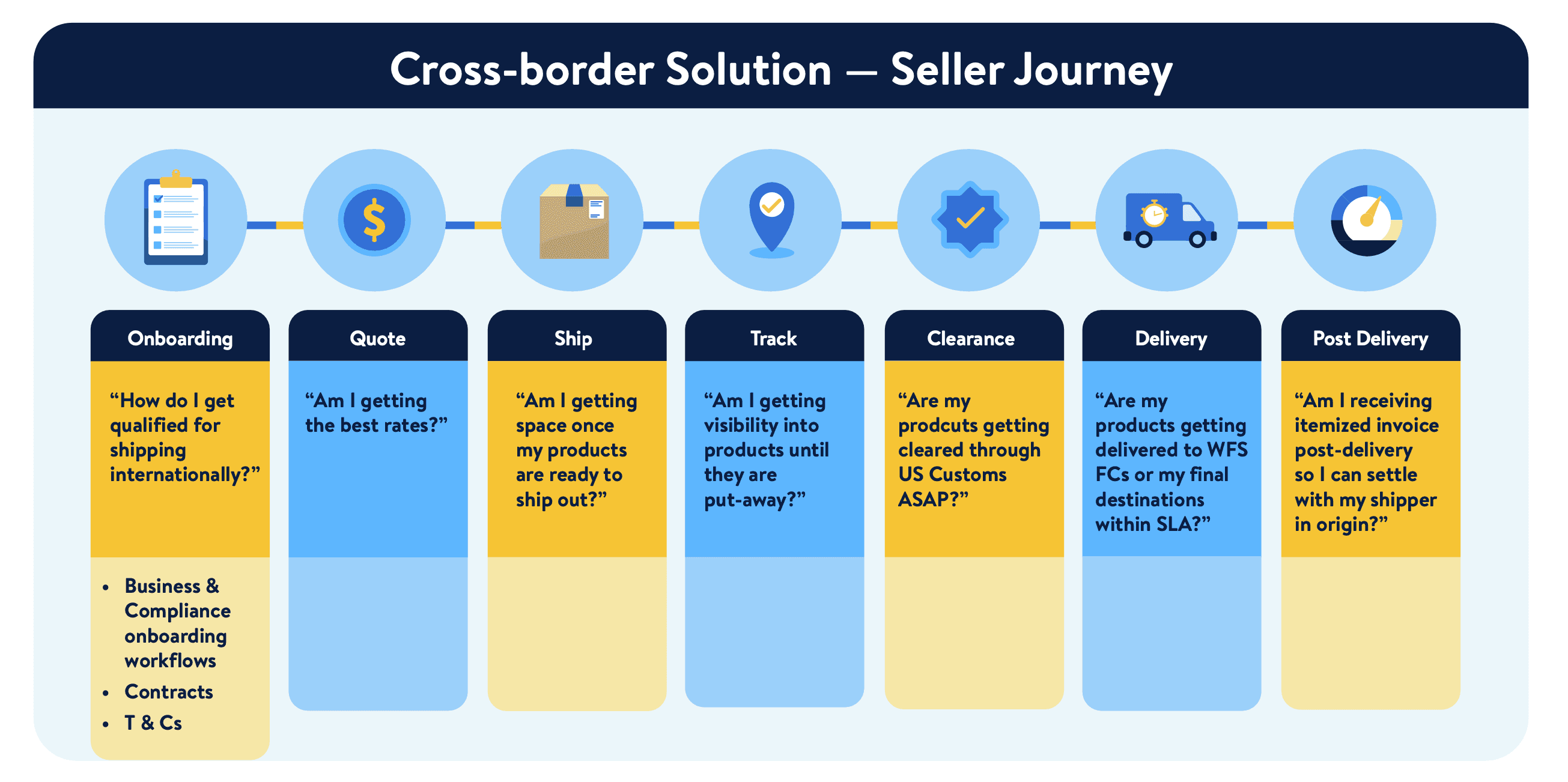
Plotting out the seller journey allowed me to identify potential seller questions and pain points. Several pain points were recurring and came up in feedback and in seller interviews. To address each, I mapped out content for an article, email, and frequently asked questions (FAQs) to the seller journey.
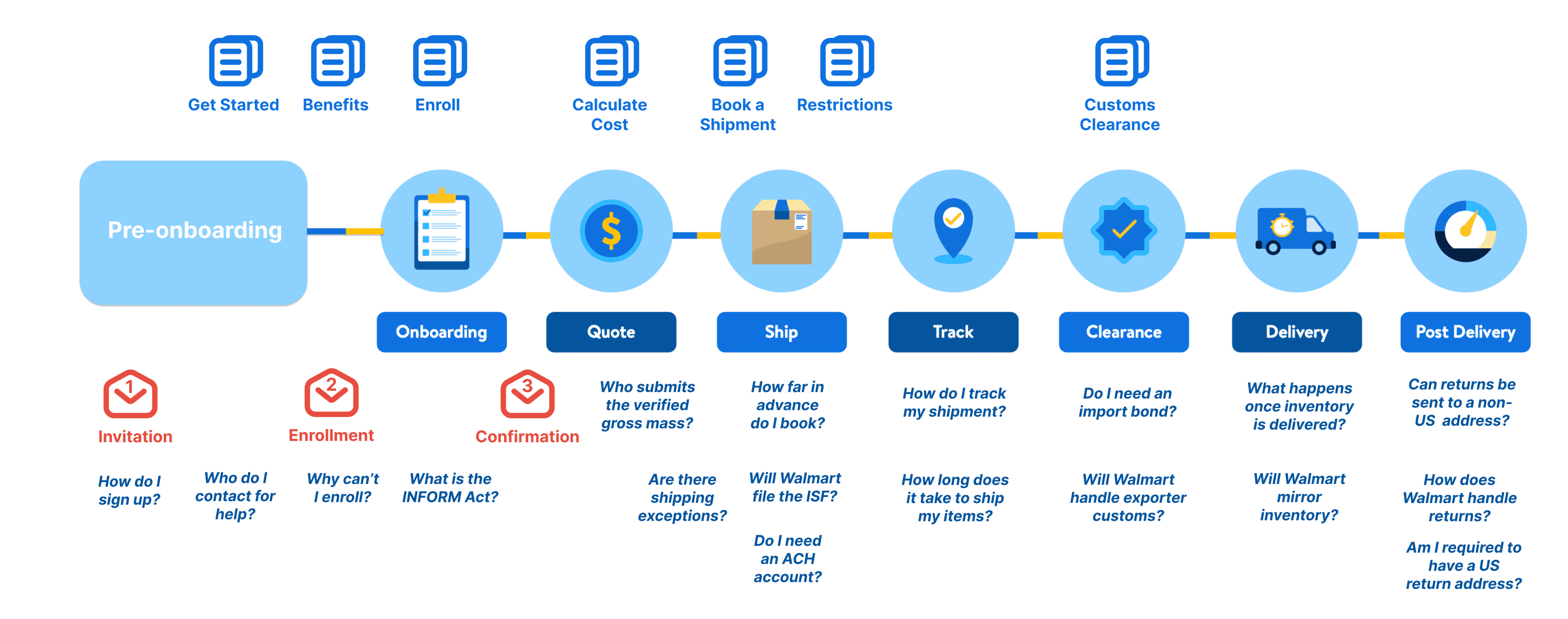
In addition to the emails, article and FAQs, I also provided in-app content. Using a combination of the 4 surface types helped address seller needs at multiple touchpoints throughout the journey.
Article
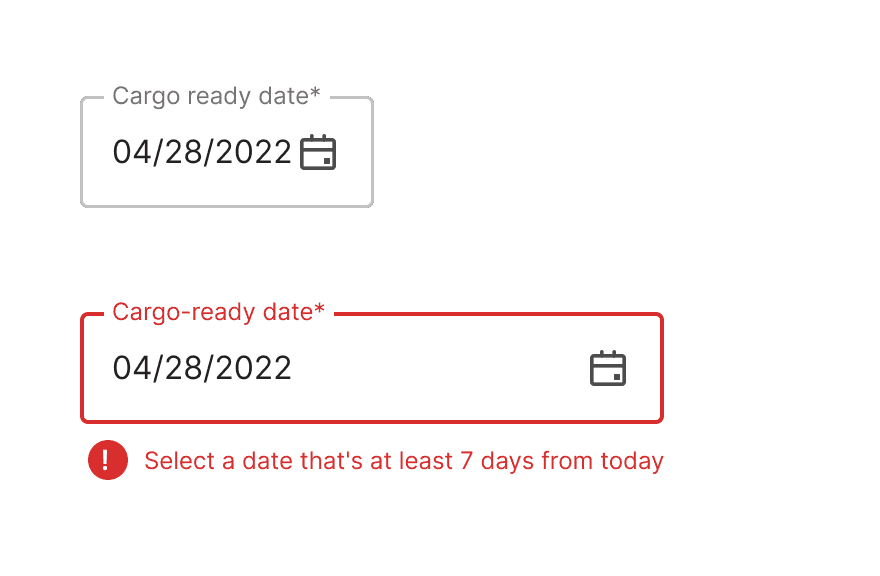
To help make your costs clear and predictable, you’re required to submit bookings at least 7 days prior to the cargo-ready date.
Make sure to book 7 days prior to the expected cargo-ready date. During peak season—typically June through October—this period may take between 14 and 21 days.
FAQ
Q: How far in advance should I book my shipment?
A: You should book your shipment at least 7 days before the rate expiration date to ensure clear and predictable costs.
App
Article
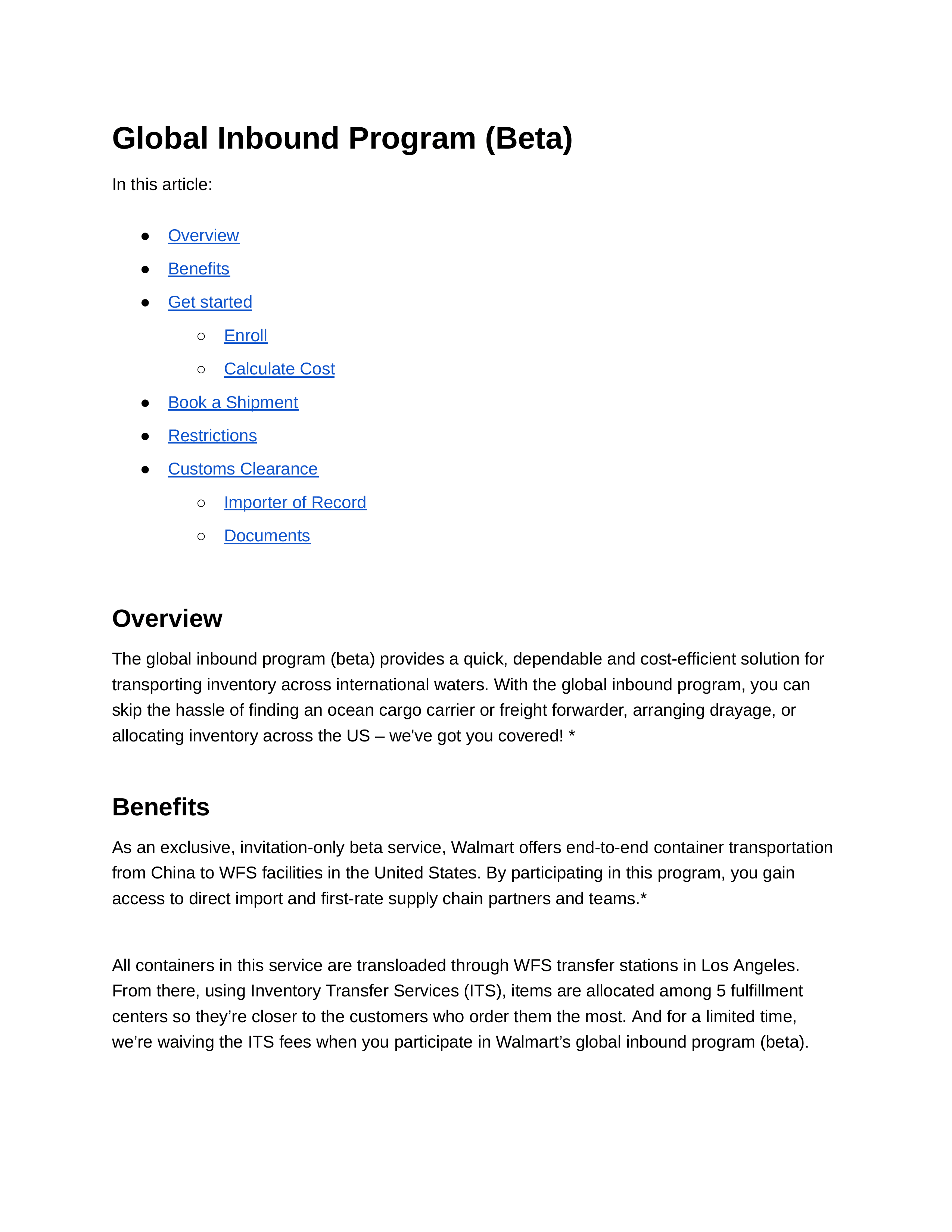
The article was also a catch-all for information that didn't fit in email or app, and I frequently directed sellers there in email and app through hyperlinks. Hosted in the Seller Center, the article includes everything from graphics to break down broker concepts to a packing list template I made for sellers to add to their shipment.
Outline
Article Outline
Overview
Benefits
Get started
Enroll
Calculate Cost
Book a shipment
Restrictions
Customs Clearance
Importer of Record
Documents
Article
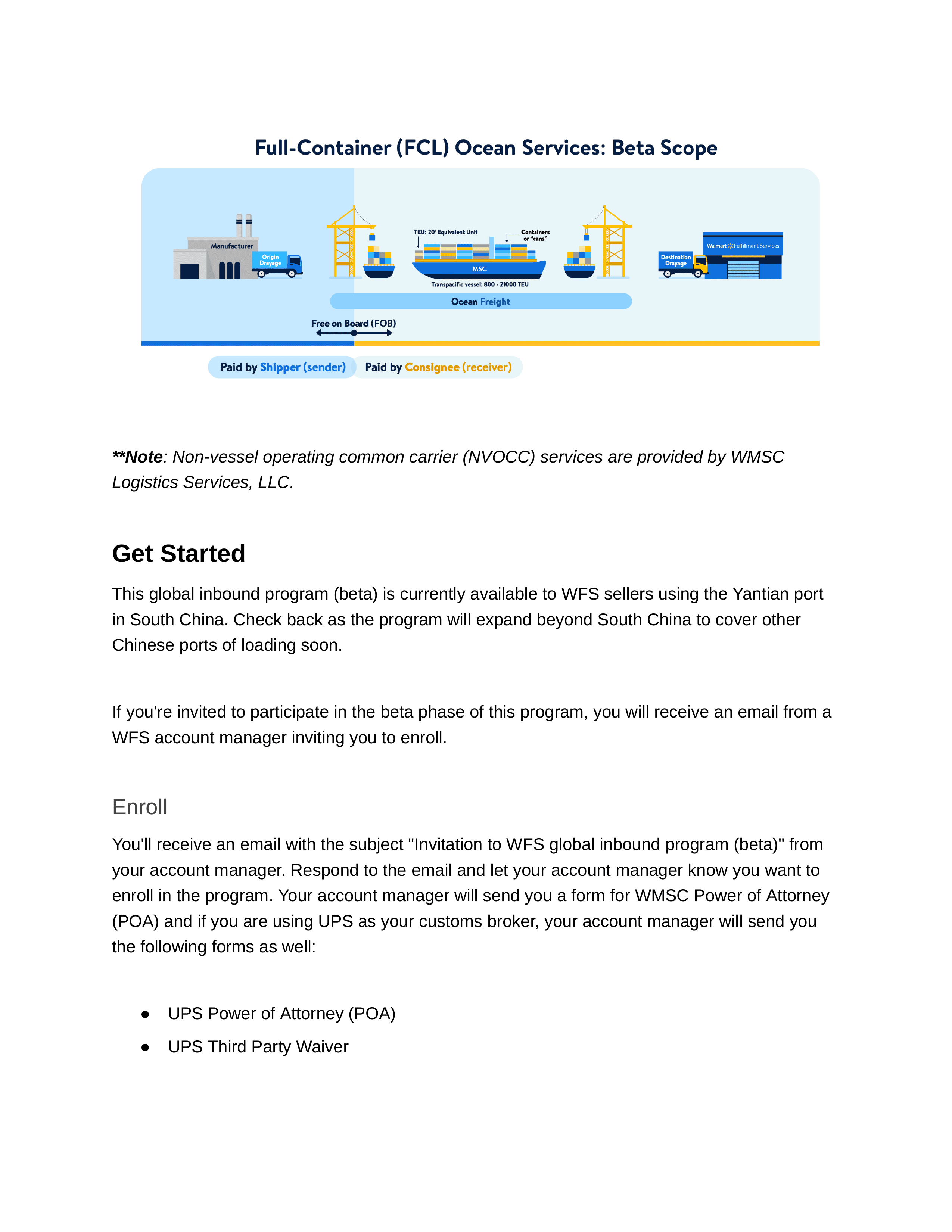
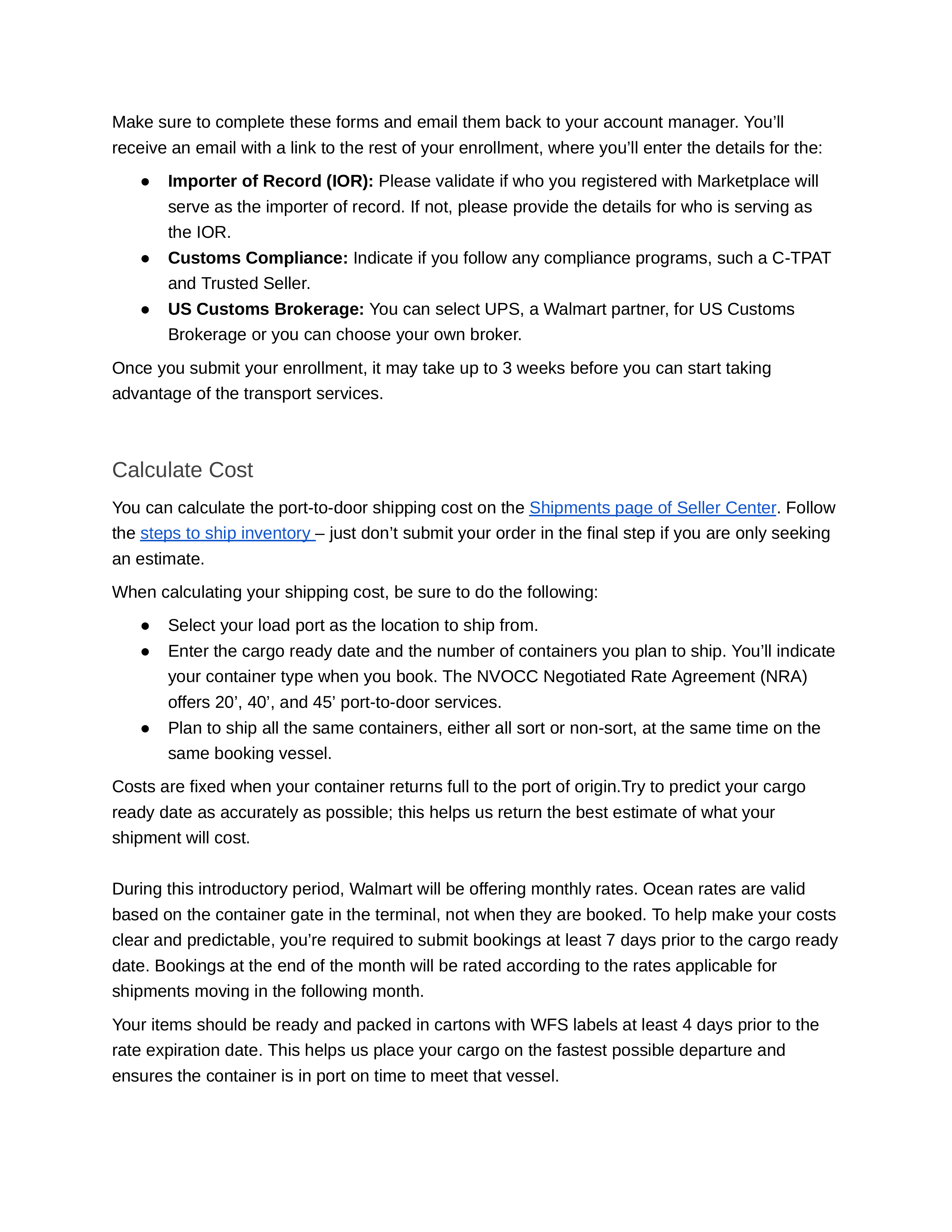
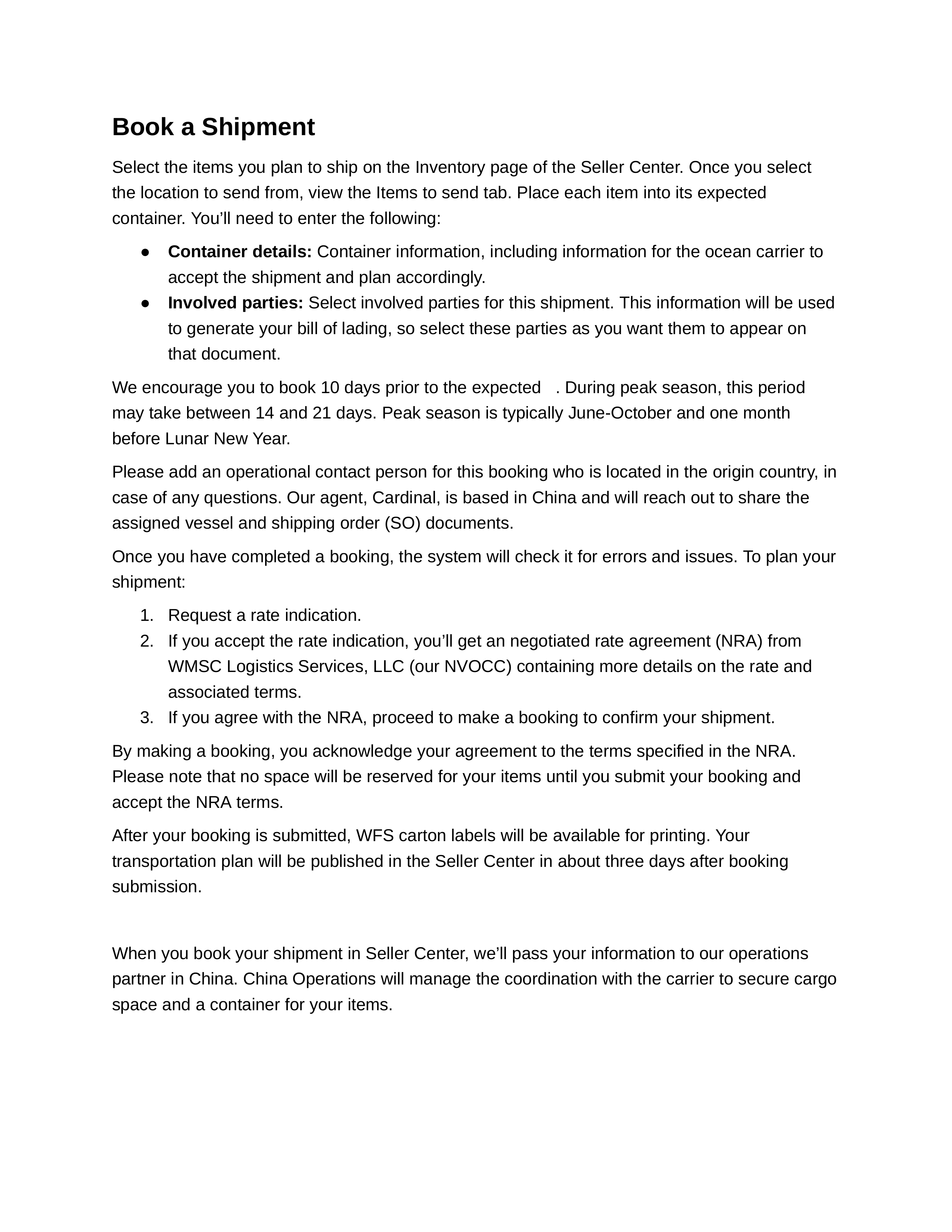
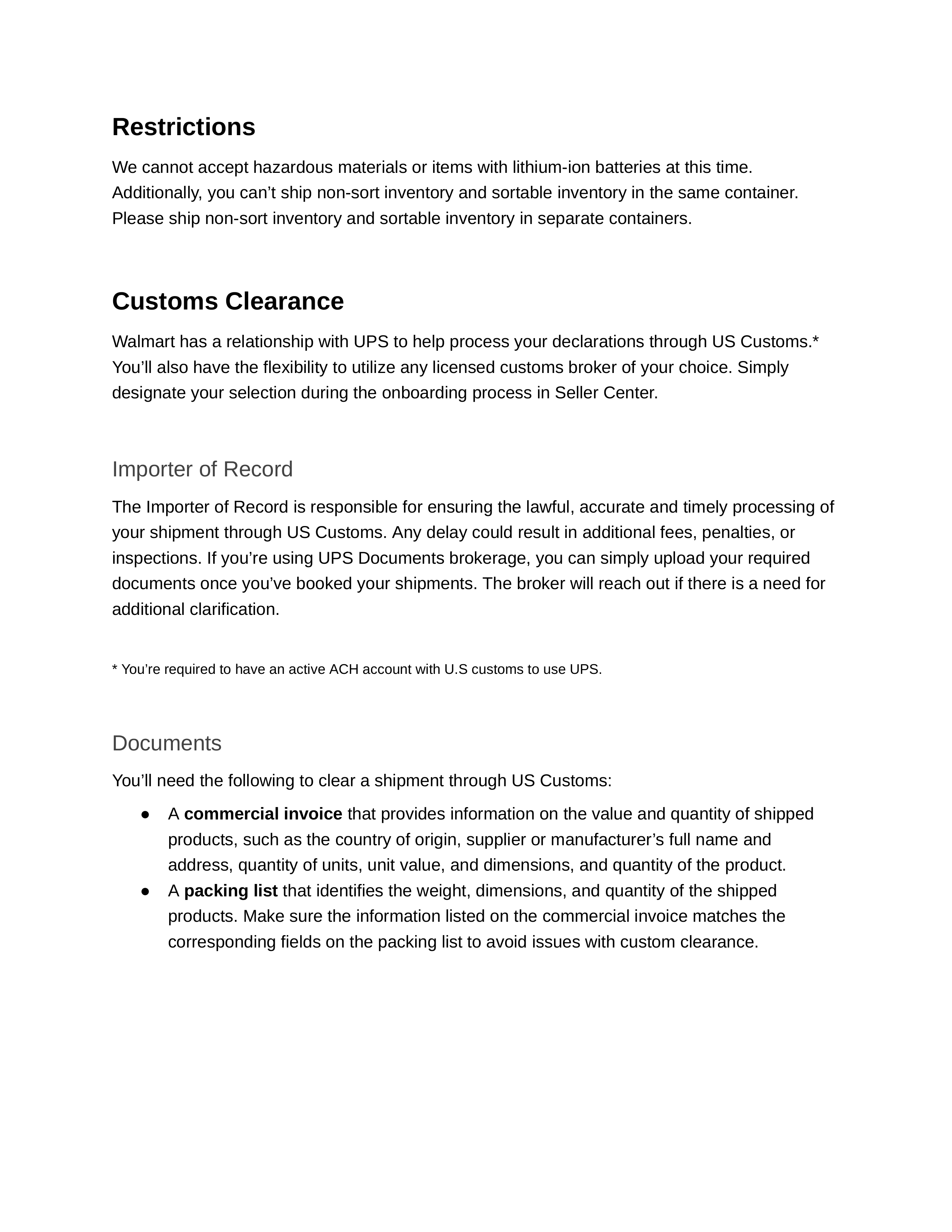
Packing list template
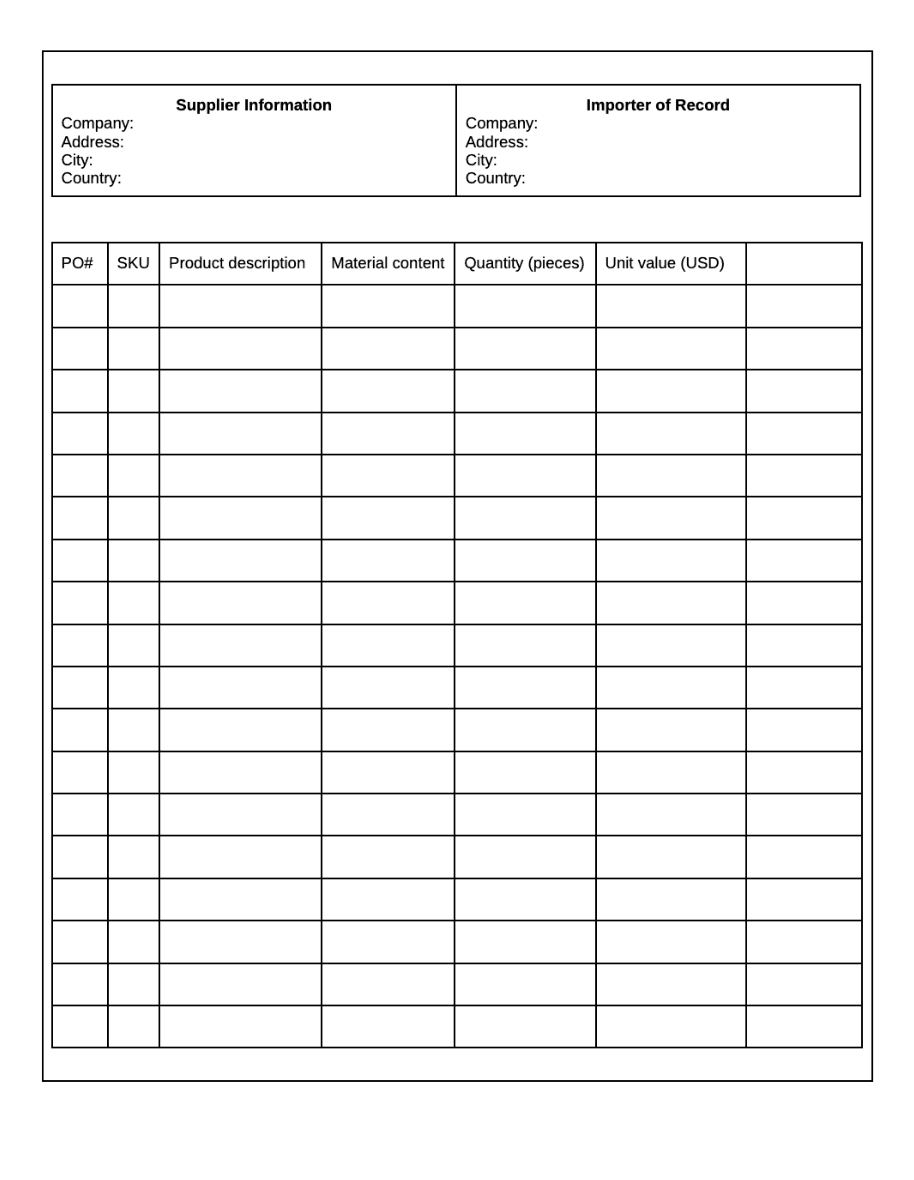
Emails
I wanted to keep emails to a minimum to avoid bombarding sellers with information. This was especially important because sellers would receive automated inventory update emails later on. Therefore, I only created emails when there was a clear call to action and essential information to share.
Email 1: Invitation
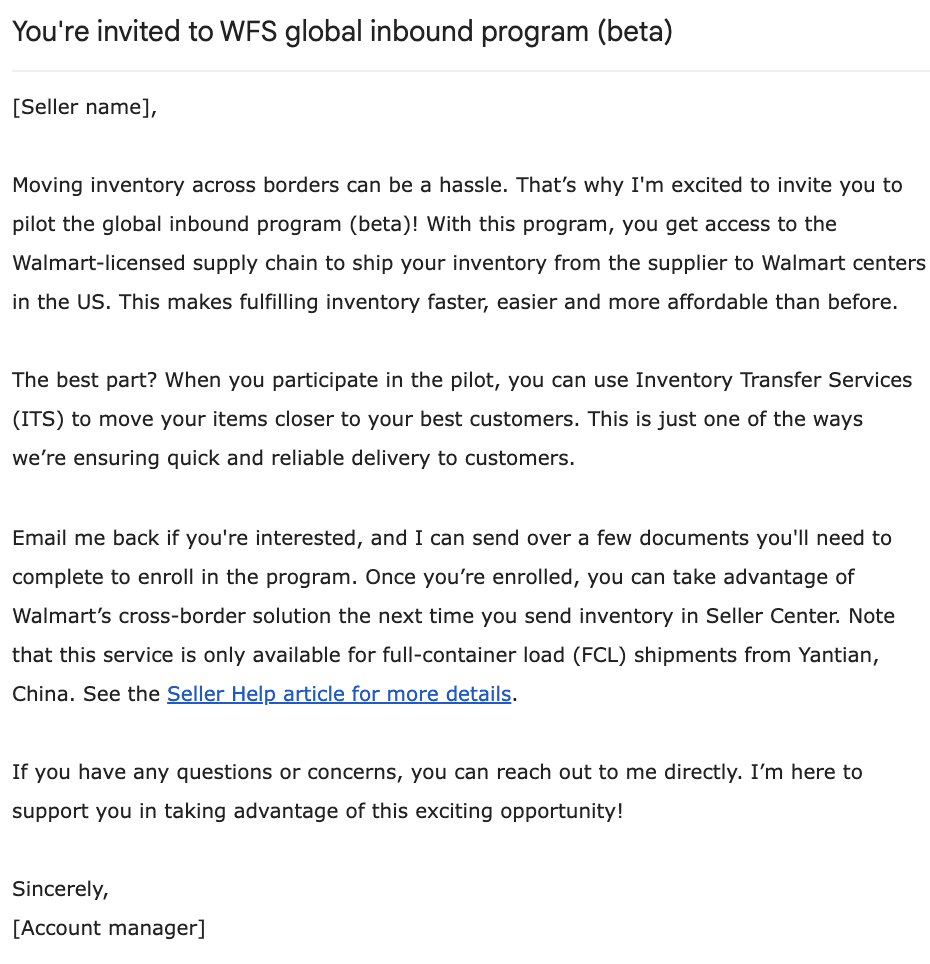
Email 2: Enrollment
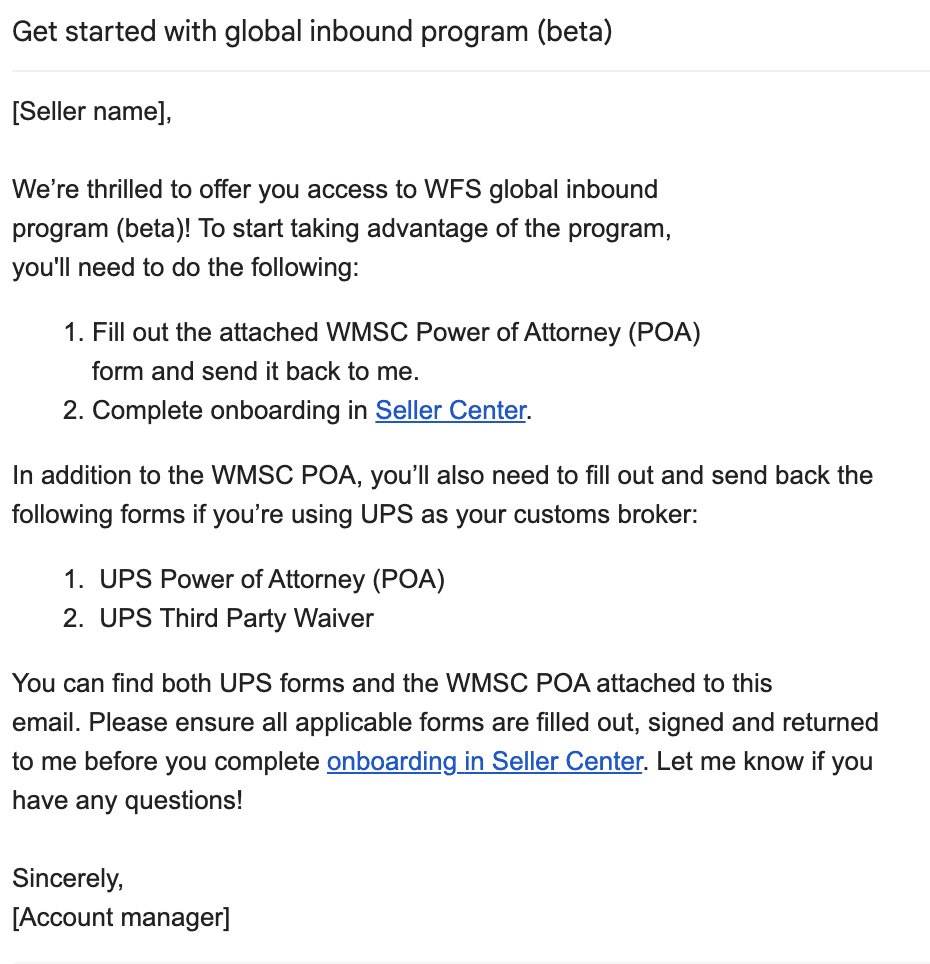
Email 3: Confirmation
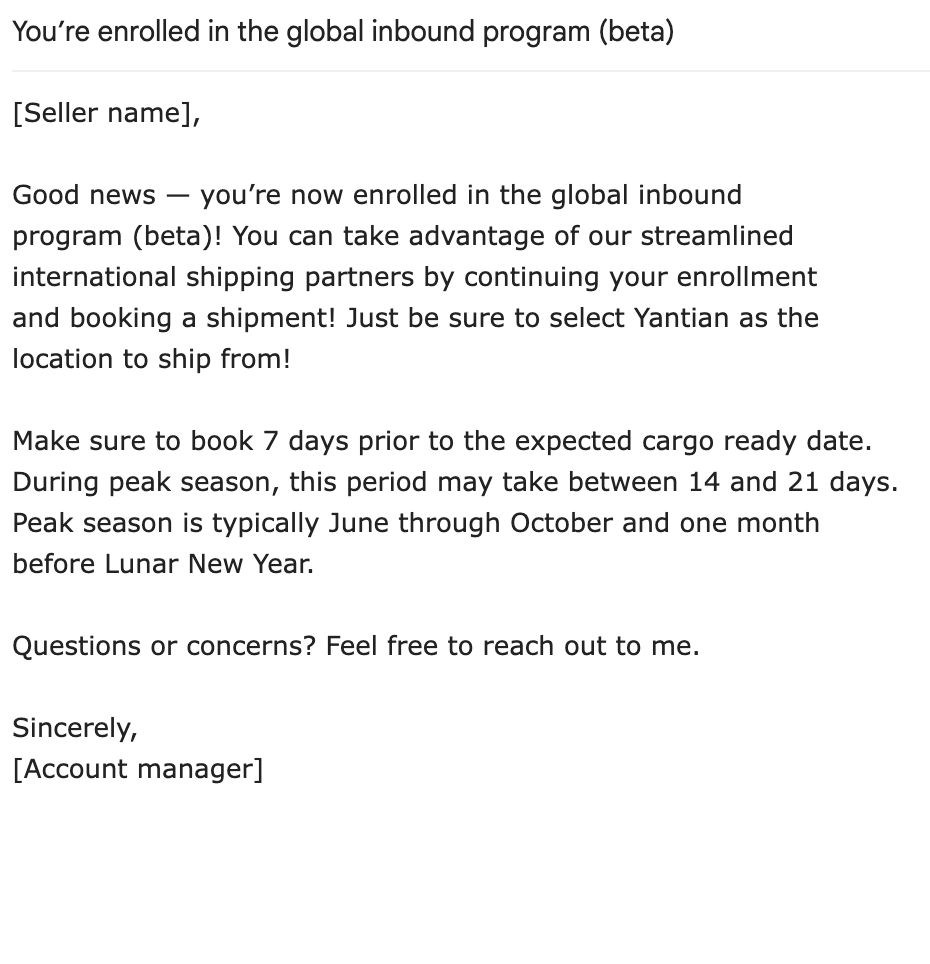
Frequently Asked Questions
Throughout the design process, I mapped potential questions to the seller journey and then sorted them into FAQs that were visible to sellers.
It was tricky coming up with frequently asked questions prior to launch, because we didn't yet have seller feedback. To come up with the questions, I brainstormed with account managers and product management to think of potential questions.
Once we launched the program, I was able to identify additional questions by joining calls between sellers and account managers, listening to seller interviews, and reading through seller emails.
How do I sign up?
Currently, the global inbound program is in beta and is only available to select sellers in Yantian, China. Talk to your account manager to get started.
Who do I contact for help?
If you can’t resolve the issue directly with Cardinal or UPS, please contact your account manager. You can also file a Seller Support case.
Do I need an importer bond?
How do I track my shipment?
You can view your shipments at any time by visiting the Shipments page in Seller Center.
Do I need insurance?
Why did I receive a second invoice?
App
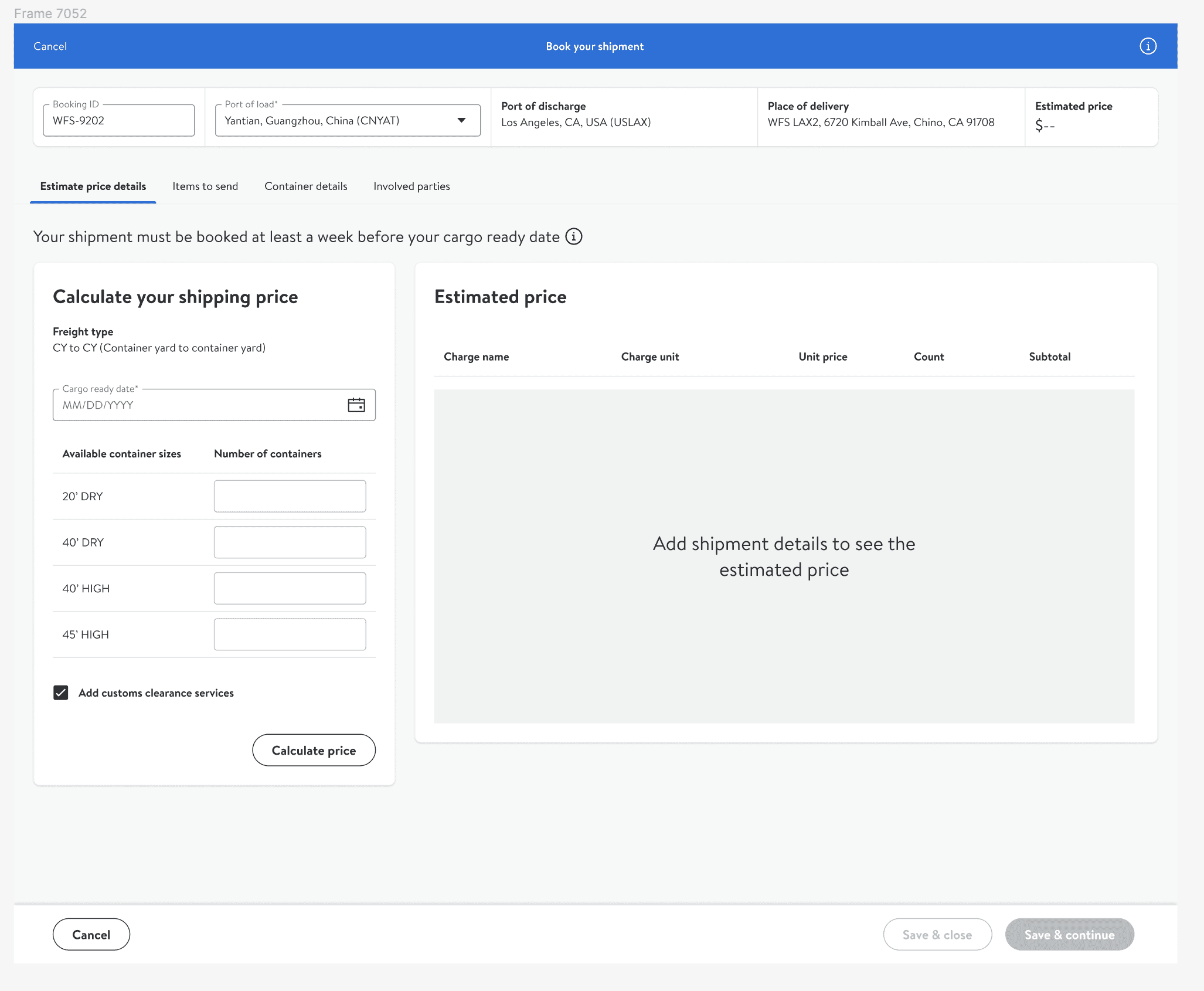
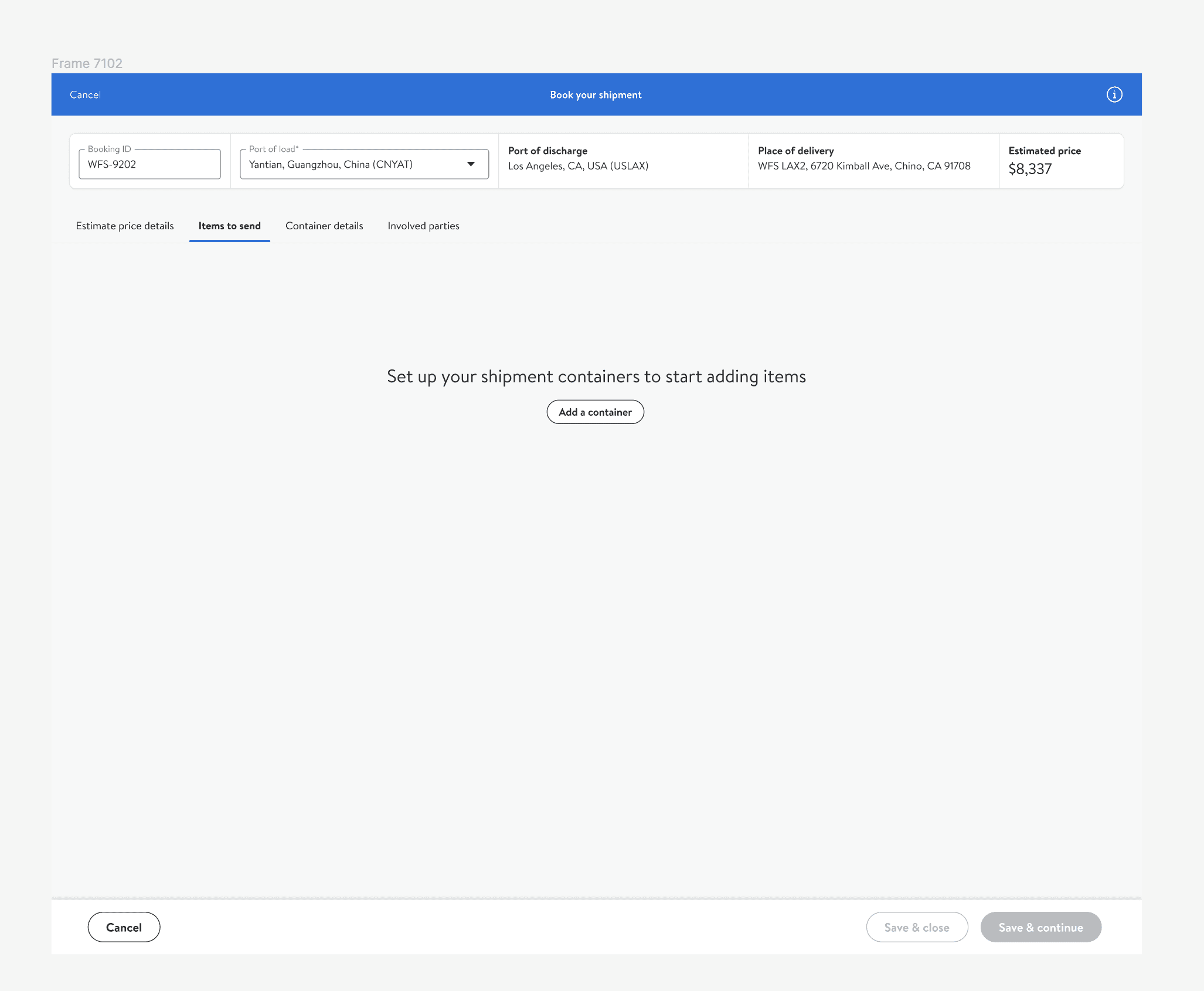
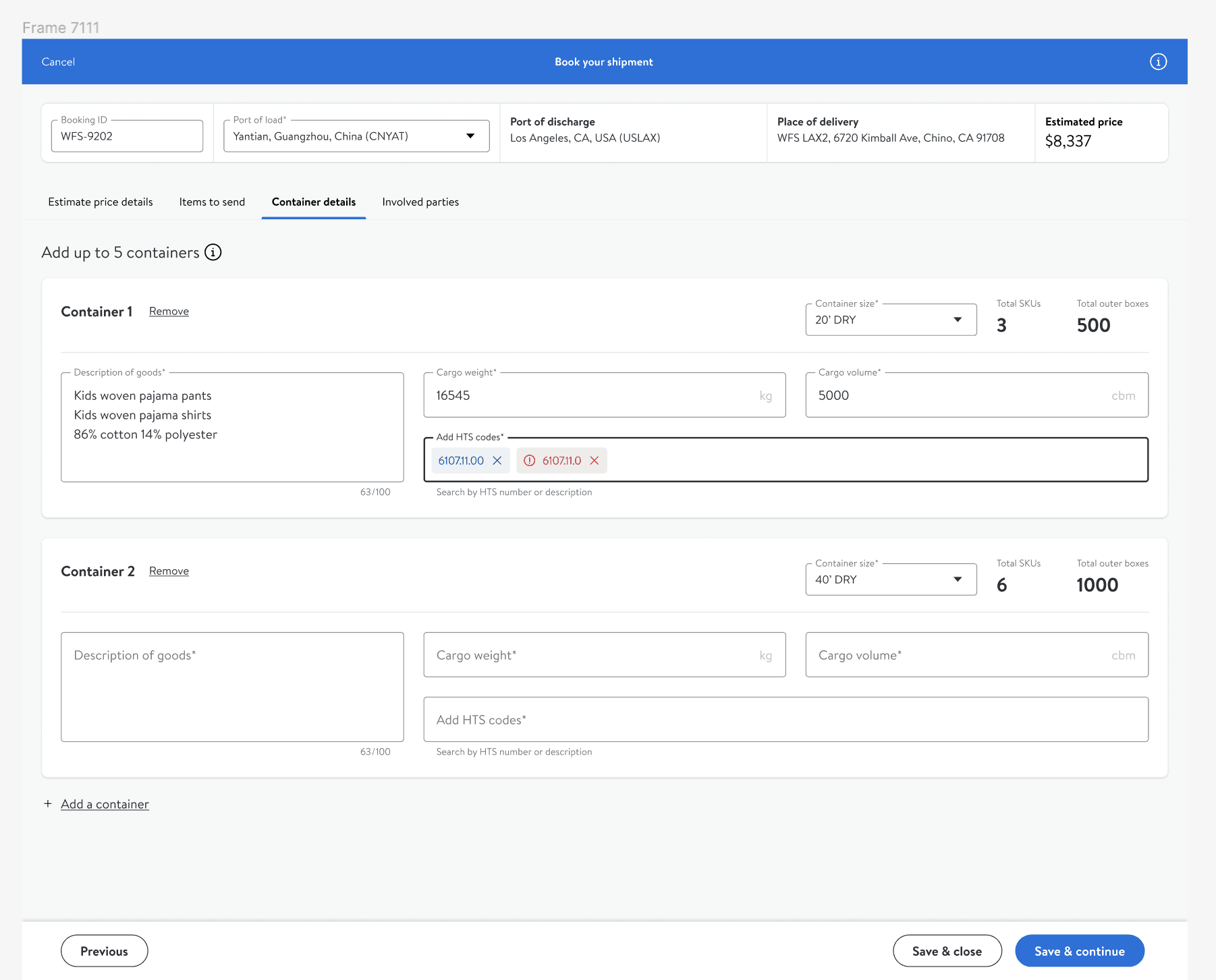
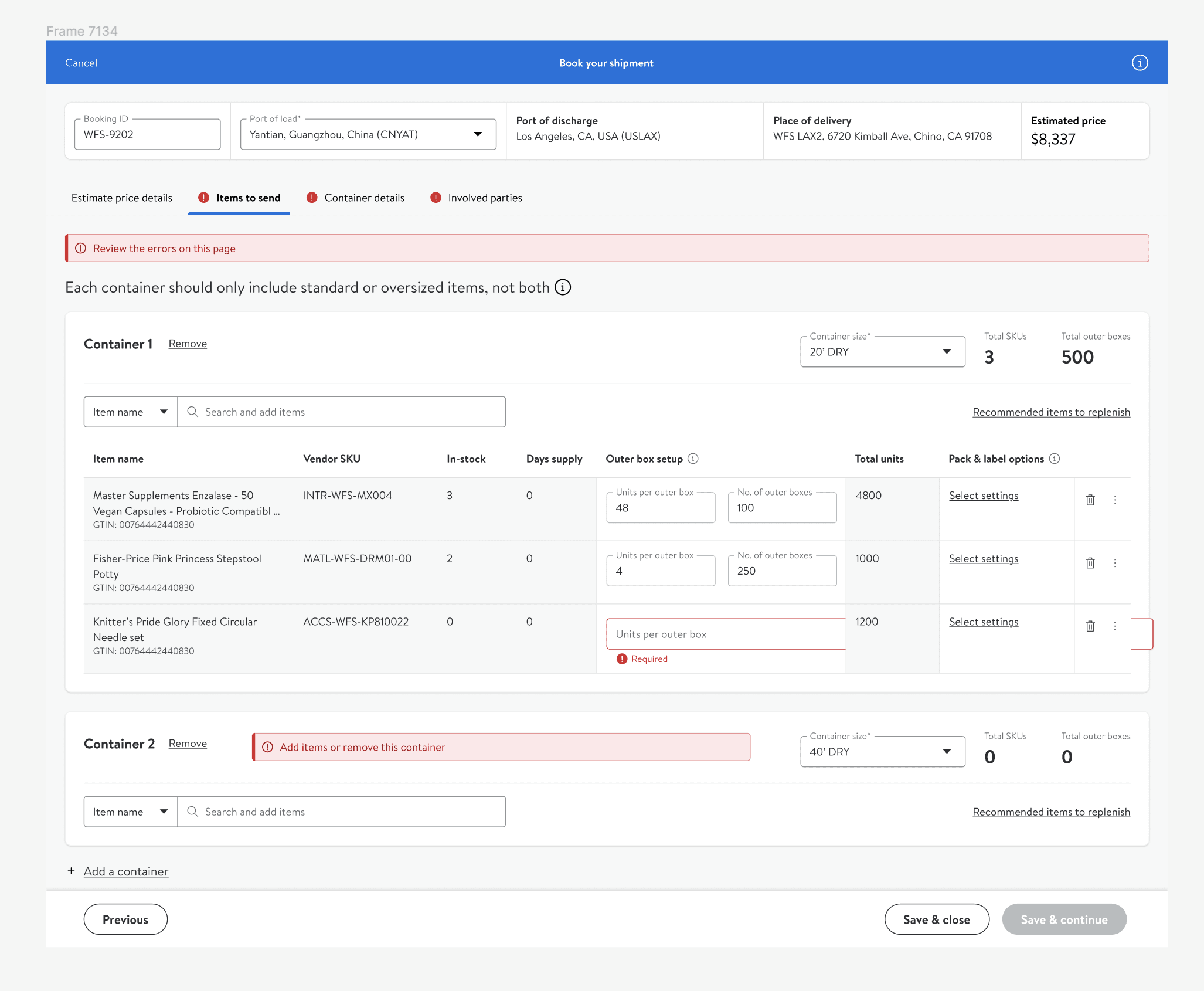
Sellers rely on the Seller Center, a desktop application, for their entire journey. This includes tasks from onboarding to checking shipment status. My focus was on enhancing the user interface content, particularly for onboarding, quoting, and booking shipments. To simplify the process of entering shipment information, I divided the form into four distinct tabs. These included estimate price details, items to send, container details, and involved parties.
Tab 1: Estimate price details
Tab 2: Items to send
Tab 3: Container details
Tab 4: Involved parties
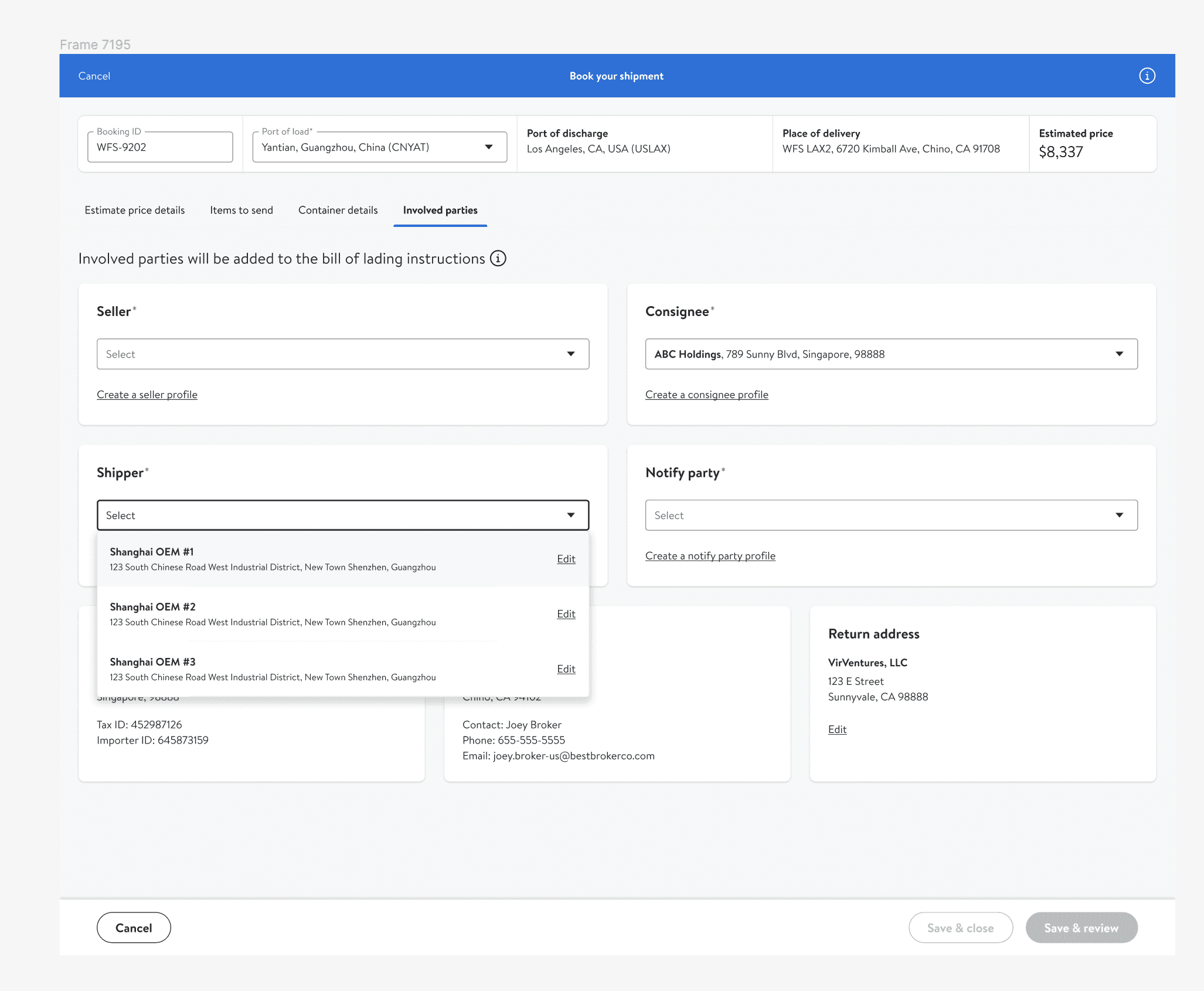
The lengthy forms required for shipping inventory across borders are a known hassle for sellers. To make it easier to fill out these forms and reduce the likelihood of making errors while booking a shipment, I added tooltips, clear labels and empty state messaging. When possible, I added interactive elements like dropdown menus to help reduce errors.
If a seller tries to continue booking a shipment after entering wrong information, they're shown a banner indicating there are errors to review.
Results
The launch of Walmart Fulfillment Services' global inbound program marked a significant milestone in our international distribution efforts. The intuitive design of the Seller Center application received positive feedback, with users highlighting the ease of navigation and the helpfulness of in-app content.
The program successfully onboarded over 30 sellers from Shenzhen in the initial phase, with a waiting list of over 100 additional sellers who are interested in the program.
Takeaways
Keeping communication concise and breaking down complex processes into simpler steps proved effective in enhancing user experience. Additionally, engaging with users through account manager interactions and analyzing feedback loops provided critical insights that shaped the program's direction. This reinforced the value of listening to the user's voice at every stage of the design process.
Walmart Cross-Border Shipping
Content design
Overview
Walmart Fulfillment Services (WFS) wanted to launch a program for international sellers to use Walmart’s transportation partners and customs brokers to send inventory to WFS warehouses in the US.
Problem
This was a new program, initially rolling out in Shenzen, China. My task was to provide all support content—including email templates and in-app strings—and ensure everything was localized to Chinese.
Goal
Surface the right information at the right time, in the right language, so international sellers can easily send inventory to the US.
Process
Mapped out the seller journey, identifying points at which sellers need communications or support.
Established a content governance framework to ensure consistency and quality across all seller-facing materials.
Met with account managers to better understand the needs of international sellers.
Worked with product designers to create intuitive and user-friendly onboarding flows.
Oversaw the translation and localization process, ensuring cultural appropriateness and accuracy in multiple languages.
Developed a feedback loop with customer support teams to identify and address common seller queries and concerns.
Coordinated with legal and compliance teams to ensure all content met international trade regulations and standards.
Design
Before getting started, I met product and program managers to align on the program’s objectives and existing development. I then pored over seller feedback and met with account managers to fully understand the challenges and needs of our international sellers. I was then able to map out the seller journey from when sellers onboard to when sellers ship inventory and it’s delivered to a Walmart fulfillment center (FC).
Plotting out the seller journey allowed me to identify potential seller questions and pain points. Several pain points were recurring and came up in feedback and in seller interviews. To address each, I mapped out content for an article, email, and frequently asked questions (FAQs) to the seller journey.
In addition to the emails, article and FAQs, I also provided in-app content. Using a combination of the 4 surface types helped address seller needs at multiple touchpoints throughout the journey.
Article
To help make your costs clear and predictable, you’re required to submit bookings at least 7 days prior to the cargo-ready date.
Make sure to book 7 days prior to the expected cargo-ready date. During peak season—typically June through October—this period may take between 14 and 21 days.
FAQ
Q: How far in advance should I book my shipment?
A: You should book your shipment at least 7 days before the rate expiration date to ensure clear and predictable costs.
App
Article
The article was also a catch-all for information that didn't fit in email or app, and I frequently directed sellers there in email and app through hyperlinks. Hosted in the Seller Center, the article includes everything from graphics to break down broker concepts to a packing list template I made for sellers to add to their shipment.
Outline
Article Outline
Overview
Benefits
Get started
Enroll
Calculate Cost
Book a shipment
Restrictions
Customs Clearance
Importer of Record
Documents
Article
Packing list template
Emails
I wanted to keep emails to a minimum to avoid bombarding sellers with information. This was especially important because sellers would receive automated inventory update emails later on. Therefore, I only created emails when there was a clear call to action and essential information to share.
Email 1: Invitation
Email 2: Enrollment
Email 3: Confirmation
Frequently Asked Questions
Throughout the design process, I mapped potential questions to the seller journey and then sorted them into FAQs that were visible to sellers. It was tricky coming up with frequently asked questions prior to launch, because we didn't yet have seller feedback. To come up with the questions, I brainstormed with account managers and product management to think of potential questions.
How do I sign up?
Currently, the global inbound program is in beta and is only available to select sellers in Yantian, China. Talk to your account manager to get started.
Who do I contact for help?
If you can’t resolve the issue directly with Cardinal or UPS, please contact your account manager. You can also file a Seller Support case.
Do I need an importer bond?
How do I track my shipment?
You can view your shipments at any time by visiting the Shipments page in Seller Center.
Do I need insurance?
Why did I receive a second invoice?
App
Sellers rely on the Seller Center, a desktop application, for their entire journey. This includes tasks from onboarding to checking shipment status. My focus was on enhancing the user interface content, particularly for onboarding, quoting, and booking shipments. To simplify the process of entering shipment information, I divided the form into four distinct tabs. These included estimate price details, items to send, container details, and involved parties.
Tab 1: Estimate price details
Tab 2: Items to send
Tab 3: Container details
Tab 4: Involved parties
The lengthy forms required for shipping inventory across borders are a known hassle for sellers. To make it easier to fill out these forms and reduce the likelihood of making errors while booking a shipment, I added tooltips, clear labels and empty state messaging. When possible, I added interactive elements like dropdown menus to help reduce errors.
If a seller tries to continue booking a shipment after entering wrong information, they're shown a banner indicating there are errors to review.
Results
The launch of Walmart Fulfillment Services' global inbound program marked a significant milestone in our international distribution efforts. The intuitive design of the Seller Center application received positive feedback, with users highlighting the ease of navigation and the helpfulness of in-app content.
The program successfully onboarded over 30 sellers from Shenzhen in the initial phase, with a waiting list of over 100 additional sellers who are interested in the program.
Takeaways
Keeping communication concise and breaking down complex processes into simpler steps proved effective in enhancing user experience. Additionally, engaging with users through account manager interactions and analyzing feedback loops provided critical insights that shaped the program's direction. This reinforced the value of listening to the user's voice at every stage of the design process.
Walmart Cross-Border Shipping
Content design
Overview
Walmart Fulfillment Services (WFS) wanted to launch a program for international sellers to use Walmart’s transportation partners and customs brokers to send inventory to WFS warehouses in the US.
Problem
This was a new program, initially rolling out in Shenzen, China. My task was to provide all support content—including email templates and in-app strings—and ensure everything was localized to Chinese.
Goal
Surface the right information at the right time, in the right language, so international sellers can easily send inventory to the US.
Process
Mapped out the seller journey, identifying points at which sellers need communications or support.
Established a content governance framework to ensure consistency and quality across all seller-facing materials.
Met with account managers to better understand the needs of international sellers.
Worked with product designers to create intuitive and user-friendly onboarding flows.
Oversaw the translation and localization process, ensuring cultural appropriateness and accuracy in multiple languages.
Developed a feedback loop with customer support teams to identify and address common seller queries and concerns.
Coordinated with legal and compliance teams to ensure all content met international trade regulations and standards.
Design
Before getting started, I met product and program managers to align on the program’s objectives and existing development. I then pored over seller feedback and met with account managers to fully understand the challenges and needs of our international sellers. I was then able to map out the seller journey from when sellers onboard to when sellers ship inventory and it’s delivered to a Walmart fulfillment center (FC).
Plotting out the seller journey allowed me to identify potential seller questions and pain points. Several pain points were recurring and came up in feedback and in seller interviews. To address each, I mapped out content for an article, email, and frequently asked questions (FAQs) to the seller journey.
In addition to the emails, article and FAQs, I also provided in-app content. Using a combination of the 4 surface types helped address seller needs at multiple touchpoints throughout the journey.
Article
To help make your costs clear and predictable, you’re required to submit bookings at least 7 days prior to the cargo-ready date.
Make sure to book 7 days prior to the expected cargo-ready date. During peak season—typically June through October—this period may take between 14 and 21 days.
FAQ
Q: How far in advance should I book my shipment?
A: You should book your shipment at least 7 days before the rate expiration date to ensure clear and predictable costs.
App
Article
The article was also a catch-all for information that didn't fit in email or app, and I frequently directed sellers there in email and app through hyperlinks. Hosted in the Seller Center, the article includes everything from graphics to break down broker concepts to a packing list template I made for sellers to add to their shipment.
Outline
Article Outline
Overview
Benefits
Get started
Enroll
Calculate Cost
Book a shipment
Restrictions
Customs Clearance
Importer of Record
Documents
Article
Packing list template
Emails
I wanted to keep emails to a minimum to avoid bombarding sellers with information. This was especially important because sellers would receive automated inventory update emails later on. Therefore, I only created emails when there was a clear call to action and essential information to share.
Email 1: Invitation
Email 2: Enrollment
Email 3: Confirmation
Frequently Asked Questions
Throughout the design process, I mapped potential questions to the seller journey and then sorted them into FAQs that were visible to sellers. It was tricky coming up with frequently asked questions prior to launch, because we didn't yet have seller feedback. To come up with the questions, I brainstormed with account managers and product management to think of potential questions. Once we launched the program, I was able to identify additional questions by joining calls between sellers and account managers, listening to seller interviews, and reading through seller emails.
How do I sign up?
Currently, the global inbound program is in beta and is only available to select sellers in Yantian, China. Talk to your account manager to get started.
Who do I contact for help?
If you can’t resolve the issue directly with Cardinal or UPS, please contact your account manager. You can also file a Seller Support case.
Do I need an importer bond?
How do I track my shipment?
You can view your shipments at any time by visiting the Shipments page in Seller Center.
Do I need insurance?
Why did I receive a second invoice?
App
Sellers rely on the Seller Center, a desktop application, for their entire journey. This includes tasks from onboarding to checking shipment status. My focus was on enhancing the user interface content, particularly for onboarding, quoting, and booking shipments. To simplify the process of entering shipment information, I divided the form into four distinct tabs. These included estimate price details, items to send, container details, and involved parties.
Tab 1: Estimate price details
Tab 2: Items to send
Tab 3: Container details
Tab 4: Involved parties
The lengthy forms required for shipping inventory across borders are a known hassle for sellers. To make it easier to fill out these forms and reduce the likelihood of making errors while booking a shipment, I added tooltips, clear labels and empty state messaging. When possible, I added interactive elements like dropdown menus to help reduce errors.
If a seller tries to continue booking a shipment after entering wrong information, they're shown a banner indicating there are errors to review.
Results
The launch of Walmart Fulfillment Services' global inbound program marked a significant milestone in our international distribution efforts. The intuitive design of the Seller Center application received positive feedback, with users highlighting the ease of navigation and the helpfulness of in-app content.
The program successfully onboarded over 30 sellers from Shenzhen in the initial phase, with a waiting list of over 100 additional sellers who are interested in the program.
Takeaways
Keeping communication concise and breaking down complex processes into simpler steps proved effective in enhancing user experience. Additionally, engaging with users through account manager interactions and analyzing feedback loops provided critical insights that shaped the program's direction. This reinforced the value of listening to the user's voice at every stage of the design process.
This project is under NDA
Enter the password to view this case study
Incorrect password — try again